
Introduction
I encountered this application while investigating a related topic at work and noticed that rarely there was any public information about how to do the PROFISafe communication between a BECKHOFF safety controller and a SIEMENS safety controller. I am not sure if this is something that BECKHOFF doesn’t want to let everyone know or it is just not popular enough.
Since I know it now, I would like everyone who wants to do this to have this information.
EL663x Overview
The BECKHOFF PROFINET communication terminals are: EL6631(-0010), EL6632, and the newly released EL6633(-0010). The below form provides the most commonly used functions of these terminals.
| EL6631 | EL6631-0010 | EL6632 | EL6633 | EL6633-0010 | |
|---|---|---|---|---|---|
| PROFINET IO Controller RT | ⬤ | ◯ | ⬤ | ⬤ | ◯ |
| PROFINET IO Controller IRT | ◯ | ◯ | ⬤ | ◯ | ◯ |
| PROFINET IO Device | ◯ | ⬤ | ◯ | ⬤ | ⬤ |
| PROFISafe IO Controller | ⬤ | ◯ | ◯ | ◯ | ◯ |
| PROFISafe IO Device | ◯ | ⬤ | ◯ | ⬤ | ⬤ |
TwinCAT Configuration
Hardware Configuration
The PROFISafe configuration on the TwinCAT side is quite complex. I will detail it as much as possible.
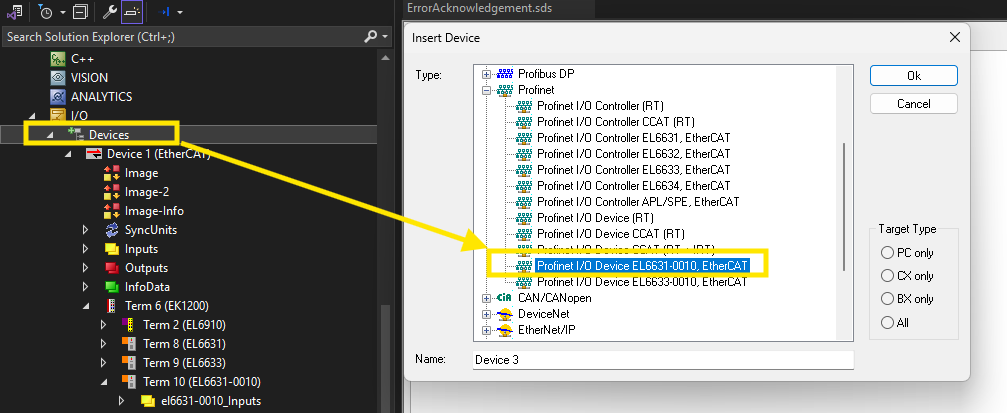
Start by adding an EL6631-0010 component in the device tree.
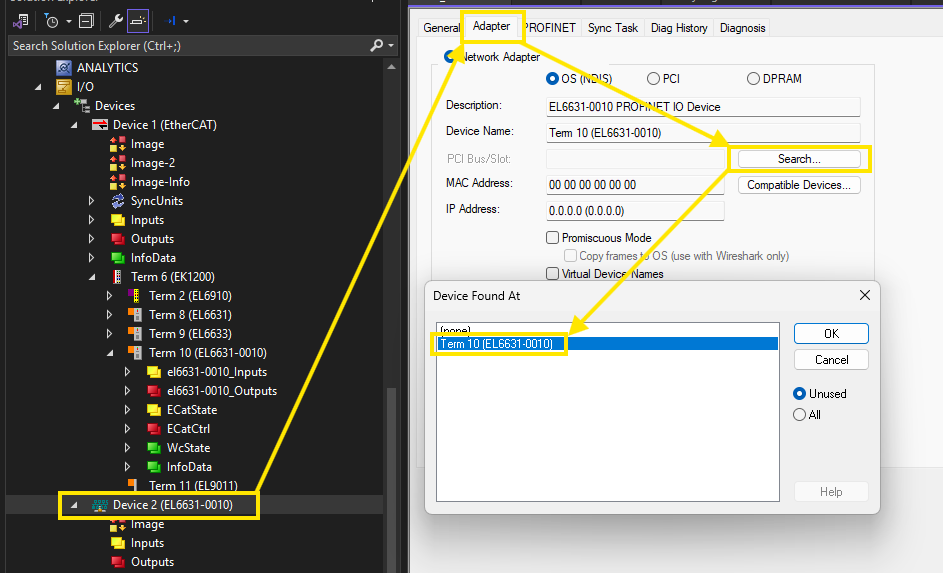
Then assign the correct network adapter to it.
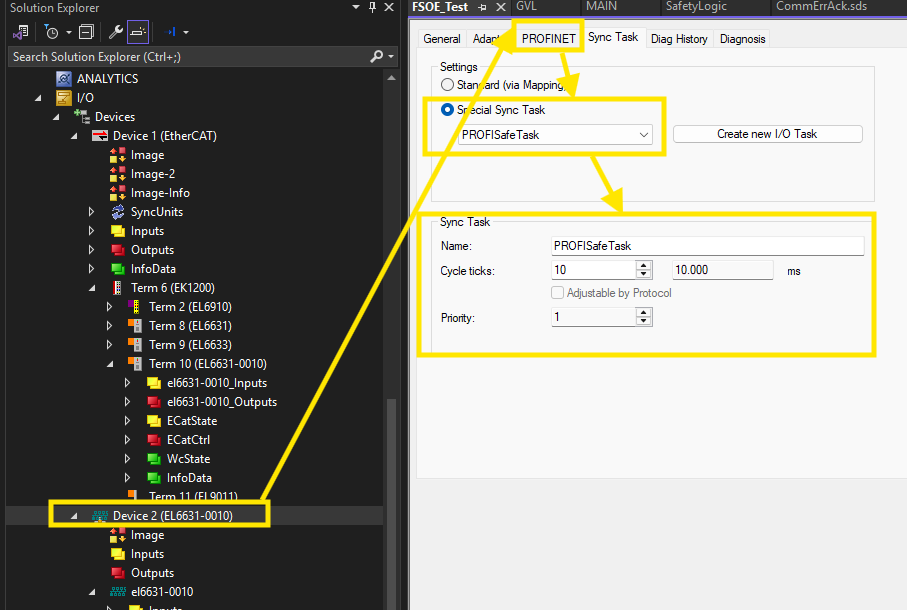
Also, create a dedicated PLC task for the PROFISafe communication.
Afterwards, add a PROFINET IO device under the newly added EL6631-0010. Use the GSD downloadable here to add the EL6631-0010 and the PROFISafe telegrams will be available.
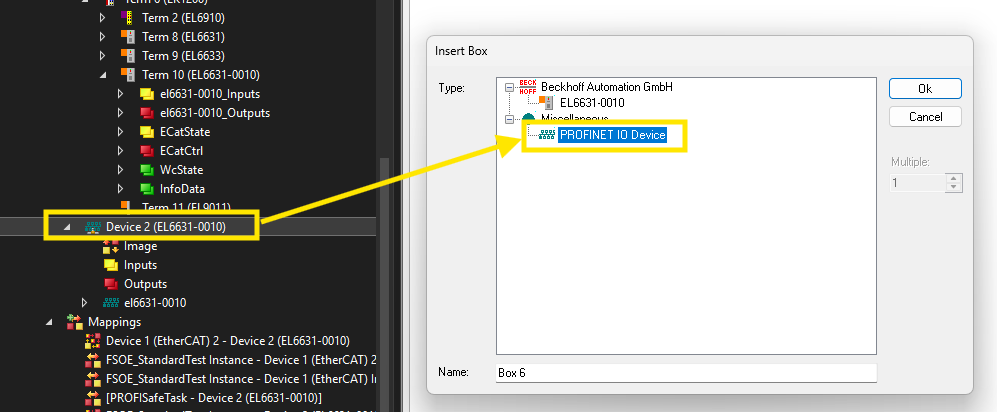
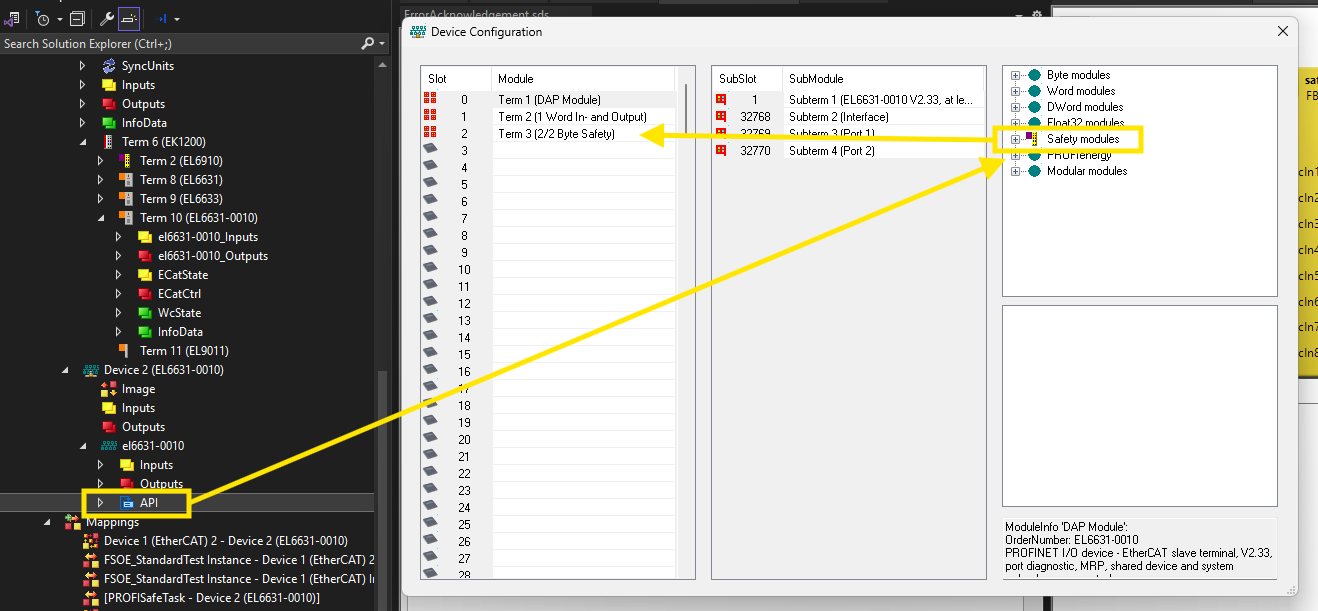
If you have used the correct GSD file, you can configure the PROFISafe telegram as shown below.
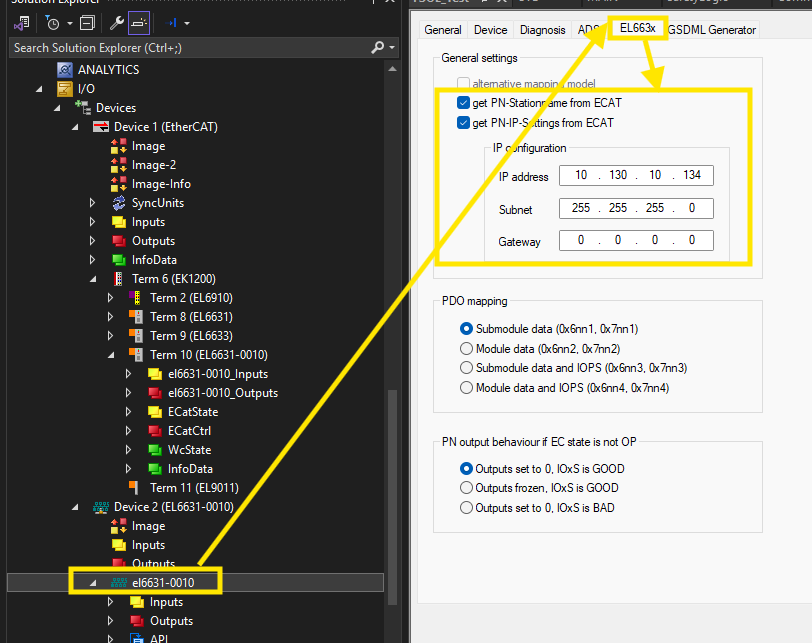
Also, you can assign the correct PROFINET IP address and device names here. You can also leave them empty and let the SIEMENS PLC assign them.
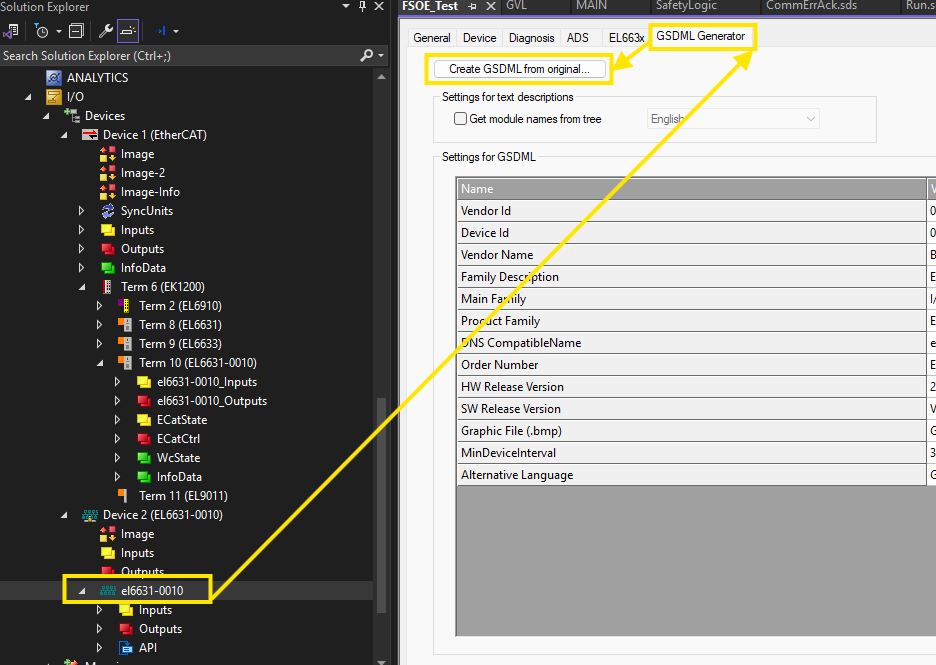
When you are happy with the configuration, you can generate the GSD for TIA Portal.
Dedicated TwinCAT Program for PROFISafe Communication
To let the BECKHOFF safety controller communicate in PROFISafe, there must be an ADS client writing specific values to an ADS register provided by BECKHOFF. BECKHOFF doesn’t provide much information about it and the explanation that I got from them was that more information may render the BECKHOFF safety controllers’ certificate because it will allow users to meddle with the safety controller.
Like it or not, we have to work with it.
Below are the programs.
PROGRAM F_Parameter_El69x0
VAR
FbWriteInd: ADSWRITEIND;
FbWriteRes: ADSWRITERES;
FbWrite: ADSWRITE;
au8EL6930NetId AT %I*: ARRAY[0..5] OF BYTE;
u16EL6930Port AT %I*: WORD;
u16EL6930State AT %I*: WORD;
u16OldState: WORD;
bWriteFPar: BOOL;
sNetId: STRING(23);
bNetIdInitialized: BOOL;
i: INT;
au16FParameter: ARRAY [0..7] OF WORD;
END_VAR
VAR PERSISTENT
au8FParameter: ARRAY[0..9] OF BYTE;
END_VAR

(* Setting AmsNetID of EL69x0 *)
IF NOT bNetIdInitialized THEN
sNetId := '';
FOR i := 0 TO 5 DO
sNetId := CONCAT(sNetId,BYTE_TO_STRING(au8EL6930NetId[i]));
sNetId := CONCAT(sNetId, '.');
END_FOR
bNetIdInitialized := TRUE;
END_IF
(* ADS Write Indication - Reading parameter data *)
FbWriteInd();
IF FbWriteInd.VALID THEN
IF FbWriteInd.LENGTH = 10 THEN
FW_MemCpy(ADR(au8FParameter), FbWriteInd.DATAADDR, 10);
bWriteFPar := TRUE;
END_IF
FbWriteRes(
NETID := FbWriteInd.NETID,
PORT := FbWriteInd.PORT,
INVOKEID := FbWriteInd.INVOKEID,
RESULT := 0,
RESPOND := TRUE
);
FbWriteRes(RESPOND := FALSE);
FbWriteInd(CLEAR := TRUE);
FbWriteInd(CLEAR := FALSE);
END_IF
memcpy(ADR(au16FParameter),ADR(au8FParameter), SIZEOF(au8FParameter));
(* Calculate parameter CRC in case of EL6910 *)
au16FParameter[7]:=F_CalcCrc011B(u16Size:=14 , u32DataAdr:= ADR(au16FParameter));
(* ADS Write - Write parameter to EL69x0 *)
FbWrite(
NETID := sNetId,
PORT := u16EL6930Port,
IDXGRP := 16#F302,
IDXOFFS := 16#FE220001,
LEN := SIZEOF(au16Fparameter),
SRCADDR := ADR(au16FParameter),
WRITE := bWriteFPar
);
IF bWriteFPar AND NOT FbWrite.BUSY THEN
IF NOT FbWrite.ERR THEN
bWriteFPar := FALSE;
END_IF
FbWrite(WRITE := FALSE);
END_IF
(* Write parameter each startup of the EL69x0 *)
IF (u16OldState AND 16#0F) <> (u16EL6930State AND 16#0F) THEN
IF (u16OldState AND 16#0F) <> 2
AND (u16OldState AND 16#0F) <> 4
AND (u16OldState AND 16#0F) <> 8 THEN
IF (u16EL6930State AND 16#0F) = 2
OR (u16EL6930State AND 16#0F) = 4
OR (u16EL6930State AND 16#0F) = 8 THEN
bWriteFPar := TRUE;
END_IF
END_IF
u16OldState := u16EL6930State;
END_IFs
The F_CalcCrc011B function is defined as below.
FUNCTION F_CalcCrc011B : WORD
VAR_INPUT
u16Size: WORD;
u32DataAdr: POINTER TO DWORD;
END_VAR
VAR
i: WORD;
b1,b2: BYTE;
u16Crc: WORD;
w1,w2: WORD;
au16CrcTab: ARRAY[0..255] OF WORD :=
[16#0000,16#011B,16#0236,16#032D,16#046C,16#0577,16#065A,16#0741,
16#08D8,16#09C3,16#0AEE,16#0BF5,16#0CB4,16#0DAF,16#0E82,16#0F99,
16#11B0,16#10AB,16#1386,16#129D,16#15DC,16#14C7,16#17EA,16#16F1,
16#1968,16#1873,16#1B5E,16#1A45,16#1D04,16#1C1F,16#1F32,16#1E29,
16#2360,16#227B,16#2156,16#204D,16#270C,16#2617,16#253A,16#2421,
16#2BB8,16#2AA3,16#298E,16#2895,16#2FD4,16#2ECF,16#2DE2,16#2CF9,
16#32D0,16#33CB,16#30E6,16#31FD,16#36BC,16#37A7,16#348A,16#3591,
16#3A08,16#3B13,16#383E,16#3925,16#3E64,16#3F7F,16#3C52,16#3D49,
16#46C0,16#47DB,16#44F6,16#45ED,16#42AC,16#43B7,16#409A,16#4181,
16#4E18,16#4F03,16#4C2E,16#4D35,16#4A74,16#4B6F,16#4842,16#4959,
16#5770,16#566B,16#5546,16#545D,16#531C,16#5207,16#512A,16#5031,
16#5FA8,16#5EB3,16#5D9E,16#5C85,16#5BC4,16#5ADF,16#59F2,16#58E9,
16#65A0,16#64BB,16#6796,16#668D,16#61CC,16#60D7,16#63FA,16#62E1,
16#6D78,16#6C63,16#6F4E,16#6E55,16#6914,16#680F,16#6B22,16#6A39,
16#7410,16#750B,16#7626,16#773D,16#707C,16#7167,16#724A,16#7351,
16#7CC8,16#7DD3,16#7EFE,16#7FE5,16#78A4,16#79BF,16#7A92,16#7B89,
16#8D80,16#8C9B,16#8FB6,16#8EAD,16#89EC,16#88F7,16#8BDA,16#8AC1,
16#8558,16#8443,16#876E,16#8675,16#8134,16#802F,16#8302,16#8219,
16#9C30,16#9D2B,16#9E06,16#9F1D,16#985C,16#9947,16#9A6A,16#9B71,
16#94E8,16#95F3,16#96DE,16#97C5,16#9084,16#919F,16#92B2,16#93A9,
16#AEE0,16#AFFB,16#ACD6,16#ADCD,16#AA8C,16#AB97,16#A8BA,16#A9A1,
16#A638,16#A723,16#A40E,16#A515,16#A254,16#A34F,16#A062,16#A179,
16#BF50,16#BE4B,16#BD66,16#BC7D,16#BB3C,16#BA27,16#B90A,16#B811,
16#B788,16#B693,16#B5BE,16#B4A5,16#B3E4,16#B2FF,16#B1D2,16#B0C9,
16#CB40,16#CA5B,16#C976,16#C86D,16#CF2C,16#CE37,16#CD1A,16#CC01,
16#C398,16#C283,16#C1AE,16#C0B5,16#C7F4,16#C6EF,16#C5C2,16#C4D9,
16#DAF0,16#DBEB,16#D8C6,16#D9DD,16#DE9C,16#DF87,16#DCAA,16#DDB1,
16#D228,16#D333,16#D01E,16#D105,16#D644,16#D75F,16#D472,16#D569,
16#E820,16#E93B,16#EA16,16#EB0D,16#EC4C,16#ED57,16#EE7A,16#EF61,
16#E0F8,16#E1E3,16#E2CE,16#E3D5,16#E494,16#E58F,16#E6A2,16#E7B9,
16#F990,16#F88B,16#FBA6,16#FABD,16#FDFC,16#FCE7,16#FFCA,16#FED1,
16#F148,16#F053,16#F37E,16#F265,16#F524,16#F43F,16#F712,16#F609];
END_VAR

u16Crc := 0;
FOR i := 0 TO (u16Size-1) DO
b1 := WORD_TO_BYTE(SHR((u16Crc AND 16#FF00), 8));
FW_MemCpy(ADR(b2), u32DataAdr+WORD_TO_DWORD(i), 1);
w1 := au16CrcTab[b1];
w2 := au16CrcTab[b2];
w1 := w1 XOR w2;
u16Crc := SHL(((SHR((w1 AND 16#FF00), 8) XOR (u16Crc AND 16#FF)) AND 16#FF),8)
+ (w1 AND 16#FF);
END_FOR
F_CalcCrc011B := u16Crc;
Program the Safety Controller
The PROFISafe communication telegrams are transferred to the BECKHOFF safety controller via a PROFISafe alias device. You can add the alias device in a safety group.
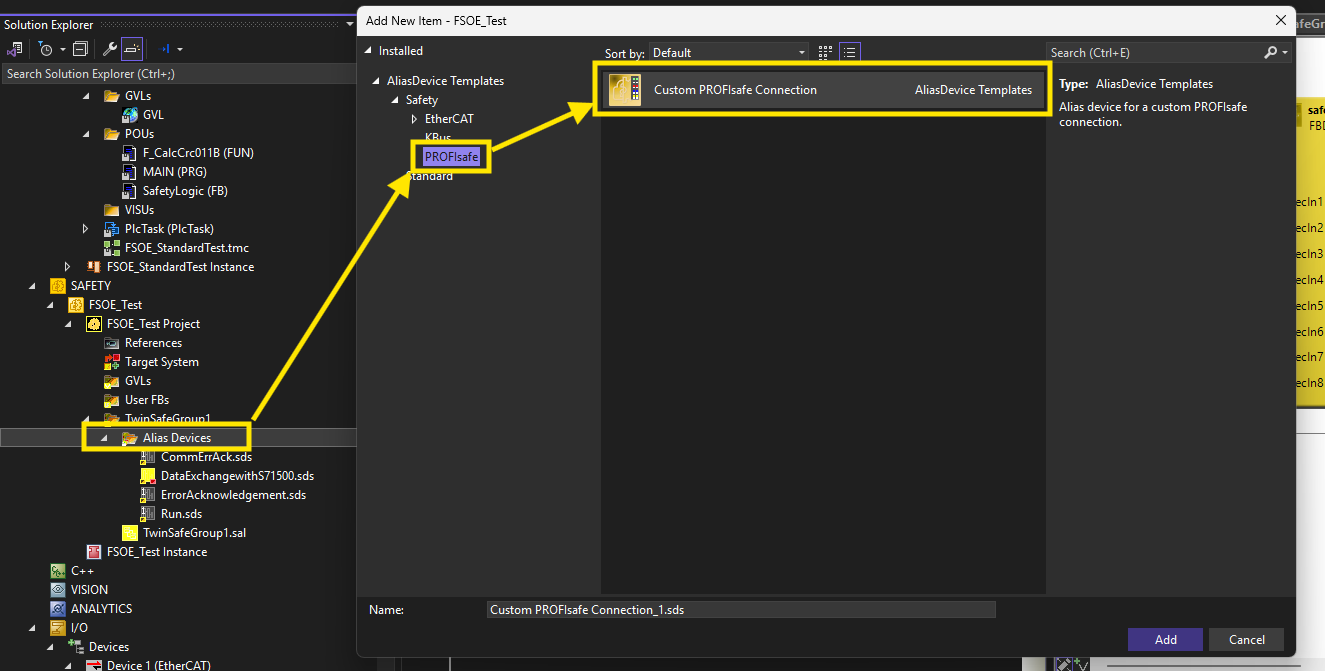
Based on the application requirement, you can configure the alias device’s process image. In short, how much safety data you want to exchange with it.
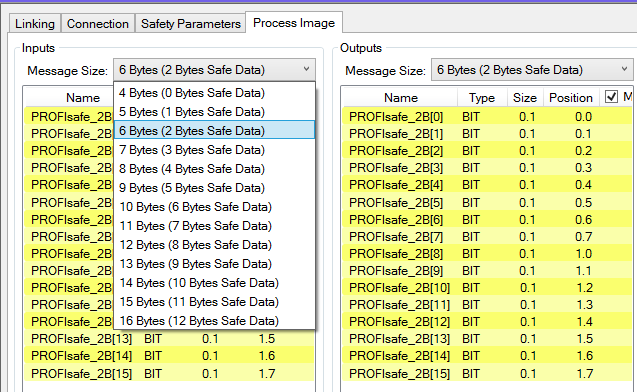
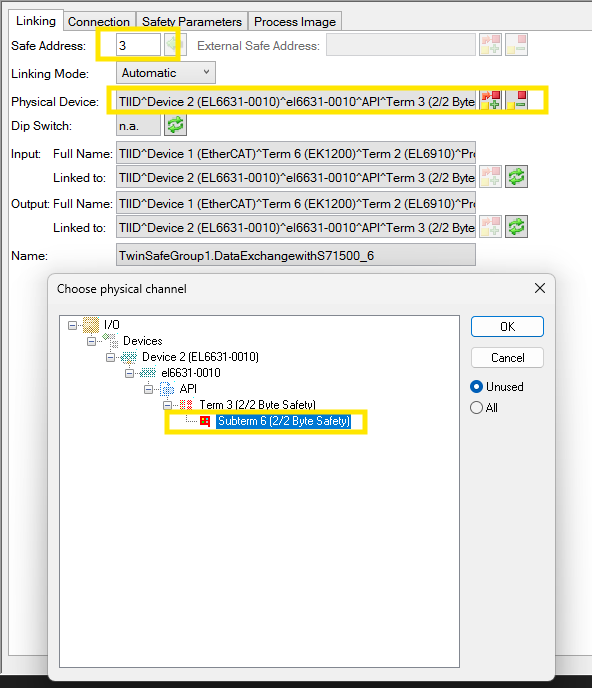
Also make sure that the alias device has an unique FSOE address. Then link the Alias device to previously configured PROFISafe telegrams in the device tree.
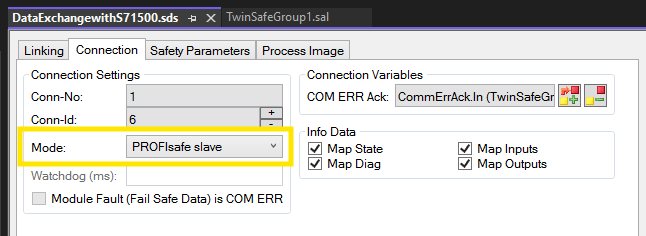
Also, make sure that the alias device works as a PROFISafe slave.
After programming the safety program, you can download the program that you are happy with to your safety controller.
The work on the BECKHOFF side is done.
TIA Portal Configuration
The work on the TIA Portal side is very simple.
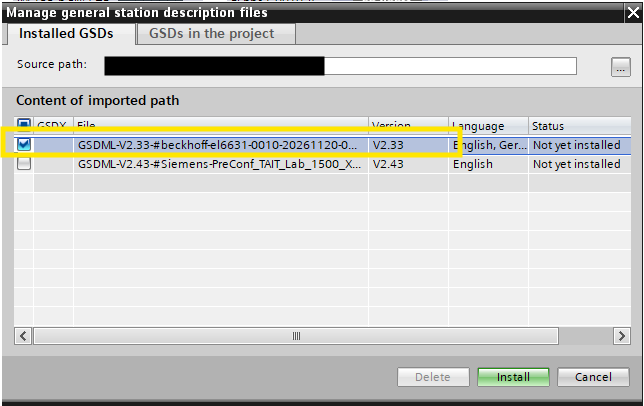
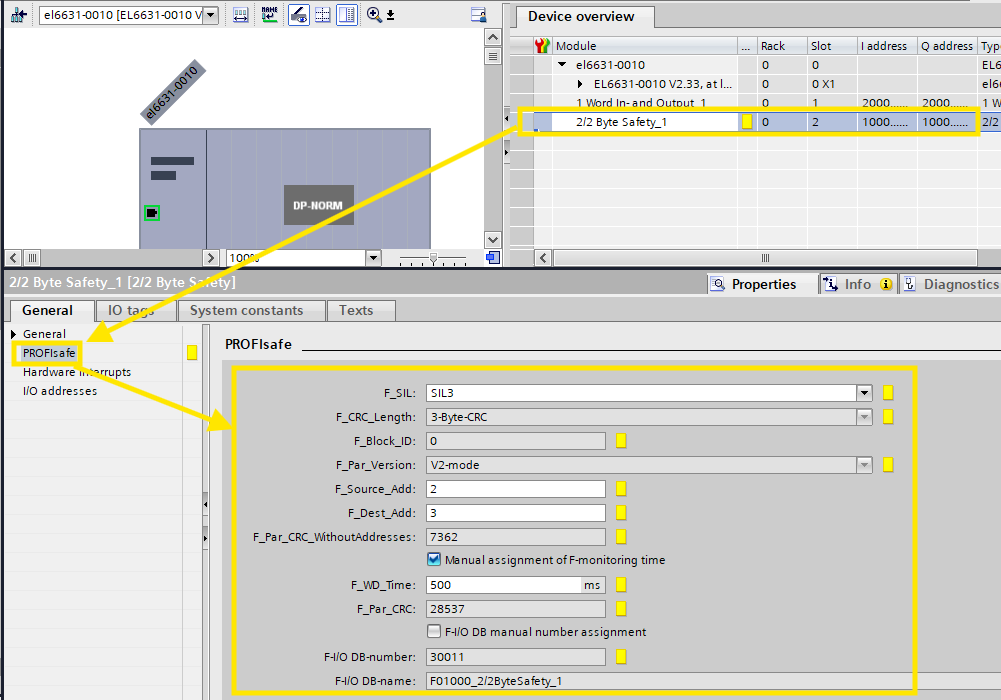
Start by installing the GSD file previously generated by us. Note that by importing the standard EL6631-0010 GSD with the PROFISafe telegrams will allow you to finish the configuration as well. However, when it comes to running the communication, it won’t work.
After installing the GSD, all you need to do is configure the PROFISafet slot for the FSOE communication. The information should match the status on the BECKHOFF side. Most of the information can be left default except the F_Source_Addr and the F_Dest_Addr. The F_Dest_Addr is the FSOE address of the alias device in your BECKHOFF configuration. The F_Source_Addr is the place holder FSOE address of your SIEMENS safety controller that communicates in PROFISafe but needs a FSOE address.
Also, create safety tags for the PROFISafe communication in the SIEMENS safety controller and download the hardware and software to the SIEMENS safety controller.
The TIA Portal side of the configuration is done.
Demonstrate the PROFISafe Communication
When establishing the PROFISafe communication, the SIEMENS safety and the BECKHOFF EL6910 safety group will be in error because the safety communication is timed out during program download / startup.
Use global error acknowledgement in TIA Portal and the safety group error acknowledgement and run command to start up the safety communication.
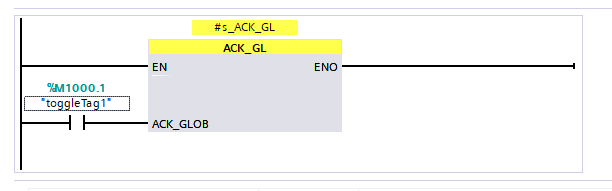
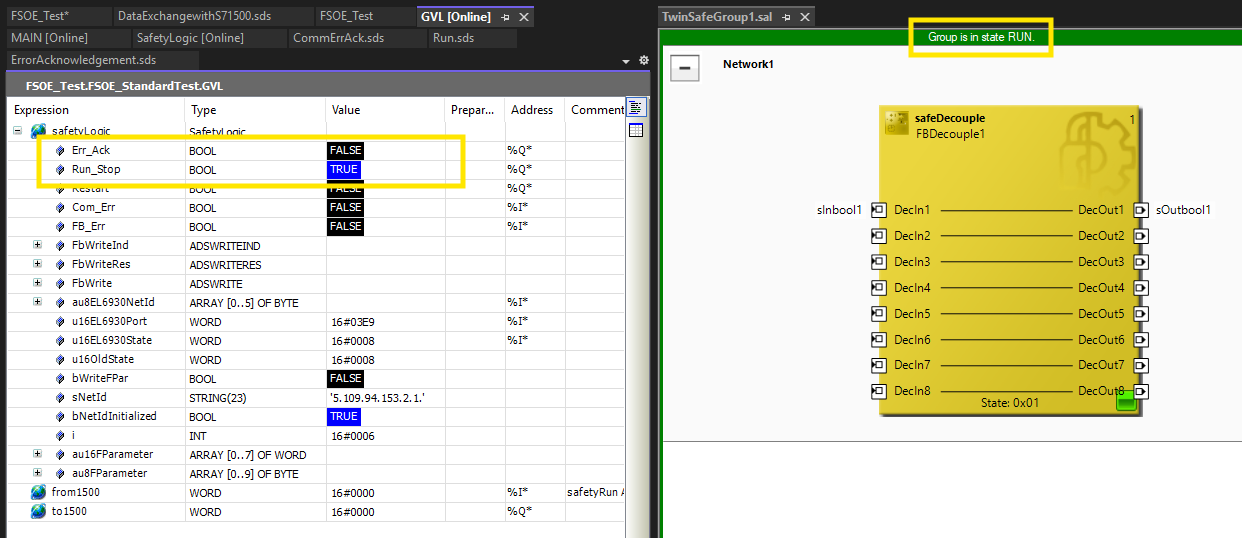
After starting up both sides, you can see that the safety communication is going well as show below.
Conclusion
In this article, I detailed and demonstrated how to establish PROFISafe communication between a S7-1500F safety controller and an EL6910 BECKHOFF safety controller via an EL6631-0010 BECKHOFF PROFINET communication gateway. The EL6910 is the PROFISafe IO device and the S7-1500F is the PROFISafe IO controller.