Introduction
Finally I’m joining the AI for control software journey.
I was skeptical about AI in the control software development knowing it can hallucinate. However, I have been enjoying its help reading documents and manuals for a long time. So why not letting it help me read PLC programs especially the spaghetti maintained by 20 engineers over 10 years period?
In this article, I’ll introduce my proof of concept tool to use Gemini with MCP to quickly read and understand PLC programs in TIA Portal.
How Does It Work
What is MCP
MCP (Model Context Protocol) is an open-source standard introduced by Anthropic in November 2024 to connect AI applications to external data sources, tools, and workflows. In December 2025, Anthropic donated MCP to the Agentic AI Foundation, a fund under the Linux Foundation.
How Does It Work with Automation Software
The MCP protocol uses server-client structure. The MCP server provides tool call services and workspace data to the client. The MCP client sends the services the MCP server can provide as schema to the LLM.
When an user writes prompts to the LLM, the LLM requests the schema and let the MCP client execute the tools to feed the data from the local workspace back to the LLM. The LLM processes the data and eventually produce the result to the user.
This work procedure looks like the below structure.
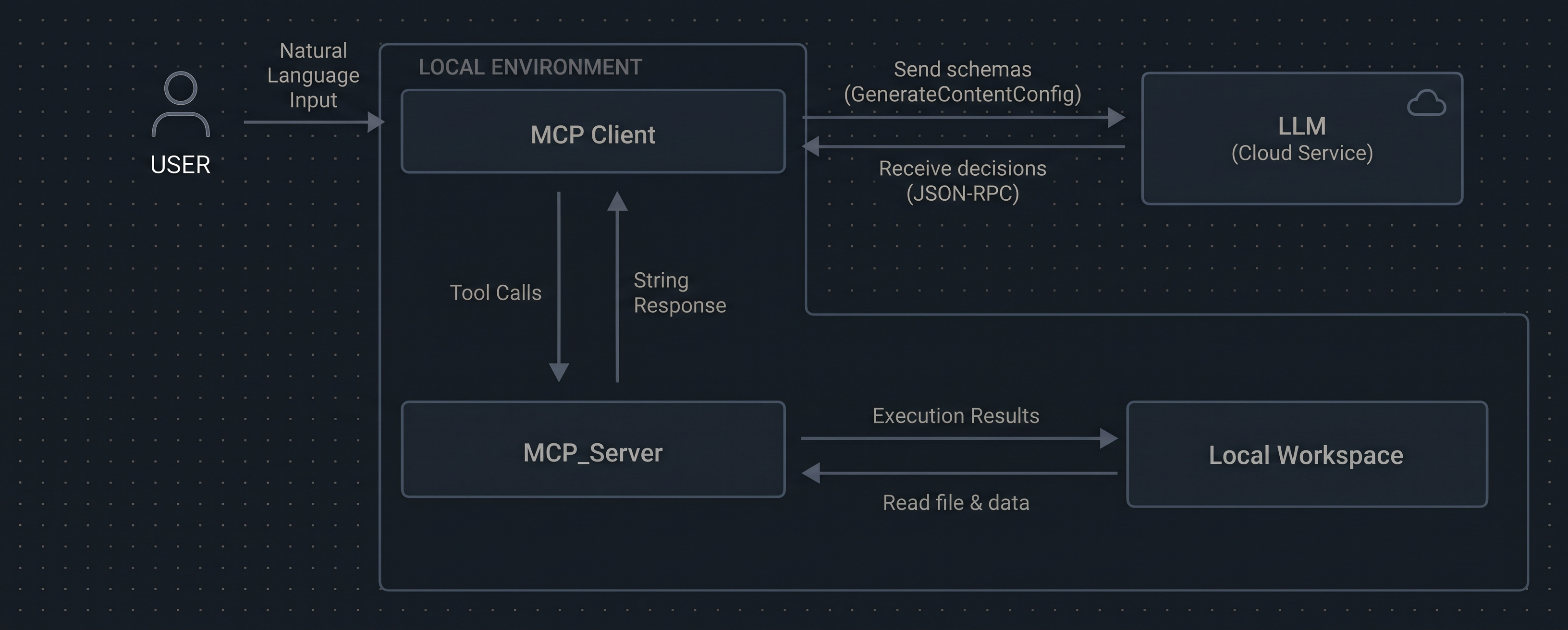
The process of request and use the data may happen multiple times between the LLM, the MCP application and the workspace before the LLM can produce a final result.
The MCP server can also provide tools for the LLM to input results back to the workspace in text format and tools to convert the text format results to other format like picture.
Demonstration
Description
In this demonstration, I have written a PLC program that uses a few notorious methods that human programmers will use like pointer access of DB data and indirect value assignment using reference. In a simple program, these methods are not that hard to understand but in a large one, tracing through the program to understand it becomes very painful to human programmers.
FUNCTION_BLOCK "FB_Calculate"
{ S7_Optimized_Access := 'TRUE' }
VERSION : 0.1
   VAR_IN_OUT
      Numbers : "numbertype";
   END_VAR

   VAR
      Value1 : Int;
      Value2 : Int;
      s_AddedValue : Int;
   END_VAR

   VAR_TEMP
      reference : REF_TO Int;
      error : Int;
      dbany : DB_ANY;
   END_VAR


BEGIN
	#Value1 := #Numbers.value1;
	#Value2 := #Numbers.value2;

	#s_AddedValue := #Value1 + #Value2;

	// POKE(area       := 16#84,
	//      dbNumber   := #Numbers,
	//      byteOffset := _dint_in_,
	//      value      := _byte_in_);

	#reference := REF("DB_Strange".secretValue);

	#reference^ := #s_AddedValue;
END_FUNCTION_BLOCK

ORGANIZATION_BLOCK "Main"
TITLE = "Main Program Sweep (Cycle)"
{ S7_Optimized_Access := 'TRUE' }
VERSION : 0.1

BEGIN
	"DB_Calculate"(Numbers := "DB_Numbers".numbers);

END_ORGANIZATION_BLOCK
However, reading through these programs is not a challenge to LLM as long as it knows how these programming skills work and it does.
Use the Tool
After running the tool with my Gemini key, I can connect to Gemini.
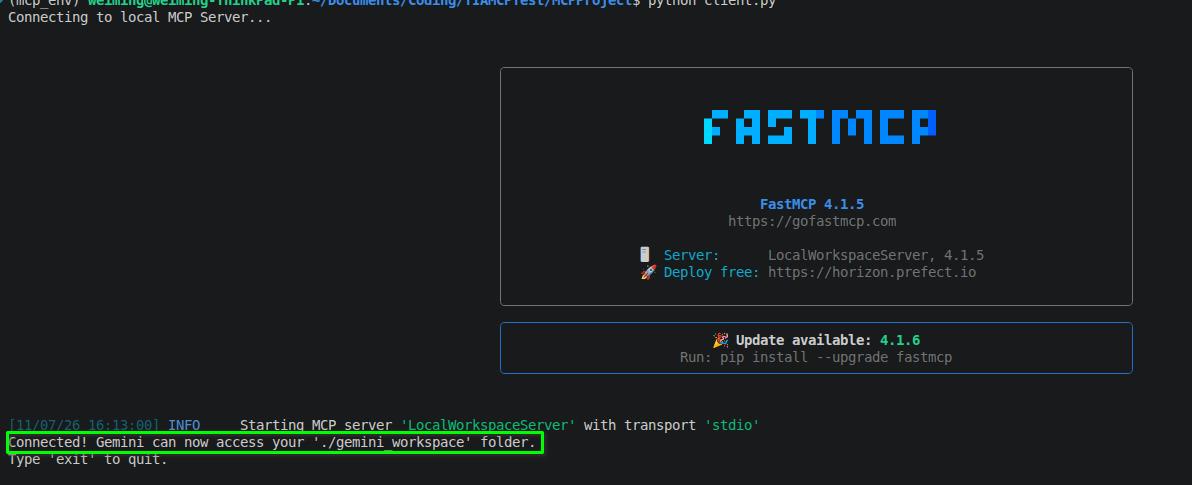
Then I asked Gemini to work out the value of the program in a condition, explain how the program works and draw a program execution flow chart.

Gemini responded by calling the tools the MCP Server provides to understand the program. Then it answered the question and explained how the program works in text.
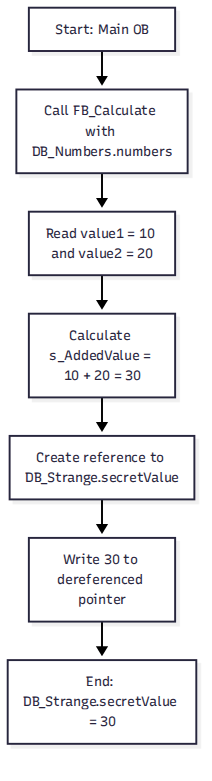
In the end, it generated a flow chart describing the program execution process and put it in the workspace.
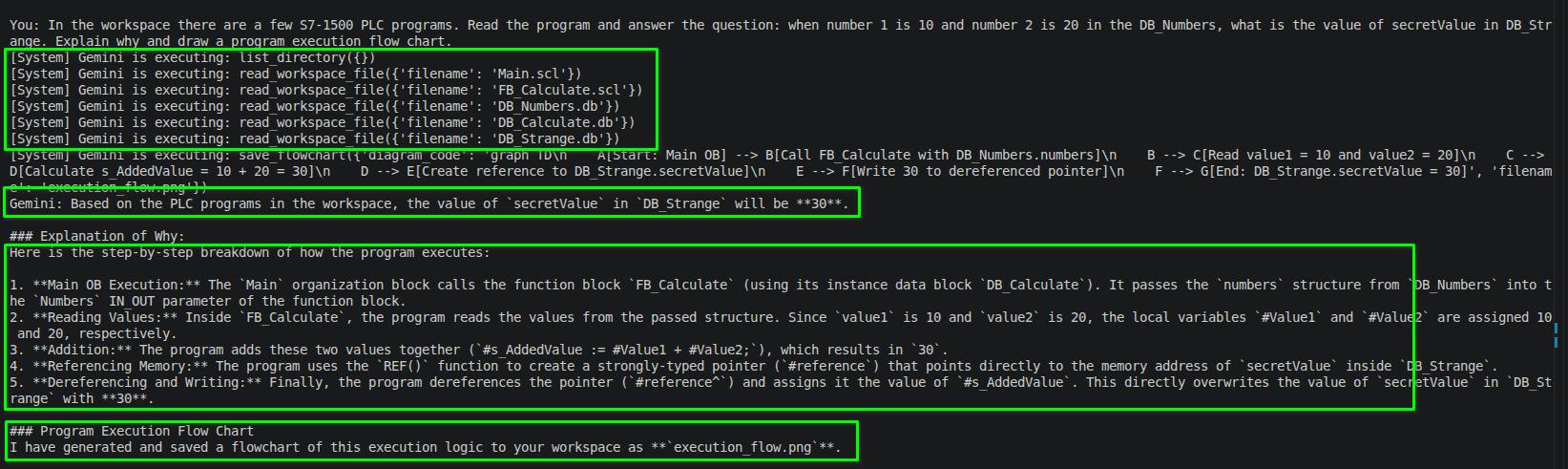
Here’s the flow chart generated by Gemini. It is pretty accurate and I believe anyone with the knowledge of how the SIEMENS PLC programming works can understand it.
Conclusion
It was very interesting to try this idea out and apparently it works quite nicely.
My planning for the next step is to write a few tools for Gemini to access the PLC’s online data using either TIA Openness or OPC UA to see how well Gemini can response to some online program troubleshooting scenarios.